
![[AndyB] Resize attachments all](/data/resource_icons/1/1332.jpg?1725665006)
- Compatibilité XF
- 2.3.x
- 2.2.x
- Description courte
- Resize images automatically with our add-on. Runs through all posts, adjusting oversized images up to specified limits. Need ImageMagick? Contact web host for installation. Setup in 5 easy steps - select settings, activate, rebuild tables. Database change creates new table. Admins only can run.
Description:
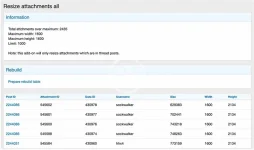
Resize all attached images in posts which are over maximum width and height allowed.
This add-on will run through all thread posts and resize any attached images which exceed the allowed maximum setting in the options page.
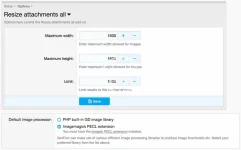
If you're not able to select ImageMagick PECL extension, contact your web host and ask them to install it.
How to use:
- Select the maximum width and height you want images to be in the Options page.
- Add "resizeattachmentsall" to your forum URL and press enter.
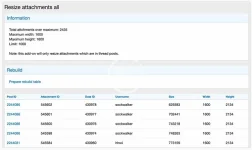
- Click the "Prepare rebuild table" link.
- Go to Rebuild caches page.
- Click the "Rebuild now" button in the Resize attachments all block.
This add-on will create a table called andy_resize_attachments_all in your database.
Questions and Answers:
Q: Who can run this add-on?
A: You must be an admin to run this add-on.


![[AndyB] Allowed attachments](/data/resource_icons/17/17205.jpg?1720149323)
![[AndyB] Convert attachments all](/data/resource_icons/15/15426.jpg?1720149311)
![[AndyB] Resize](/data/resource_icons/7/7860.jpg?1720149279)