
![[AndyB] SoundCloud manager](/data/resource_icons/10/10103.jpg?1720149290)
- Compatibilité XF
- 2.2.x
- Description courte
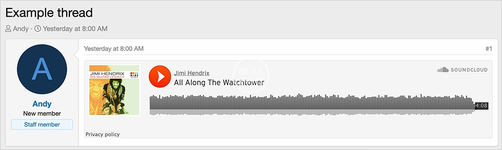
- Update your SoundCloud media site to use a smaller player size for better visibility. Simply navigate to admin.php?bb-code-media-sites/soundcloud/small, reload the page, and save changes. To revert back to the default player, use admin.php?bb-code-media-sites/soundcloud/default.
Updates the SoundCloud BB code media site to show the smaller player.
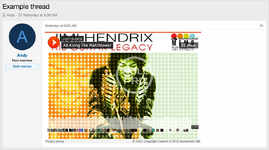
(Example of small SoundCloud player)
How to update with small SoundCloud media player:
Navigate to the following page:
Admin control panel -> Content -> BB code media sites -> SoundCloud
In the URL remove the edit and replace with small.
admin.php?bb-code-media-sites/soundcloud/small
reload the the page and it will update with the small code. Click the Save and exit button.
How to restore to default SoundCloud media player:
Navigate to the following page:
Admin control panel -> Content -> BB code media sites -> SoundCloud
In the URL remove the edit and replace with default.
admin.php?bb-code-media-sites/soundcloud/default
reload the the page and it will update with the default code. Click the Save and exit button.
(Example of small SoundCloud player)
How to update with small SoundCloud media player:
Navigate to the following page:
Admin control panel -> Content -> BB code media sites -> SoundCloud
In the URL remove the edit and replace with small.
admin.php?bb-code-media-sites/soundcloud/small
reload the the page and it will update with the small code. Click the Save and exit button.
How to restore to default SoundCloud media player:
Navigate to the following page:
Admin control panel -> Content -> BB code media sites -> SoundCloud
In the URL remove the edit and replace with default.
admin.php?bb-code-media-sites/soundcloud/default
reload the the page and it will update with the default code. Click the Save and exit button.


![[AndyB] Ad manager](/data/resource_icons/8/8631.jpg?1720149279)
![[AndyB] Affiliate manager](/data/resource_icons/4/4391.jpg?1720149256)
![[AndyB] Attachment Manager](/data/resource_icons/4/4500.jpg?1720149262)