
![[cXF] Highlight new menu item](/data/resource_icons/19/19737.jpg?1712116166)
- Compatibilité XF
- 2.2.x
- 2.3.x
- Description courte
- Enhance your XenForo 2.x menu with custom icons using this DIY tutorial. Add or edit Font Awesome icons via CSS for hover effects, color changes, and specific styles like Pro or Brands. Customize easily with our step-by-step guide.
This is a DIY tutorial to achieve this:
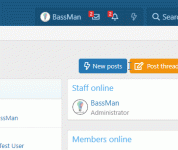
As you can see you can get an icon that changes on hover only on new items just to highlight them a bit more.
Open your extra.less...
As you can see you can get an icon that changes on hover only on new items just to highlight them a bit more.
Open your extra.less...
Vous n'êtes pas autorisé à consulter l'intégralité du contenu de cette ressource.
Se connecter ou s'inscrire dès maintenant.


![[.🇨🇺] Post Color Highlighting](/data/resource_icons/11/11945.jpg?1720149296)
![[cXF] Change default FA node icon](/data/resource_icons/19/19738.jpg?1720149334)
![[cXF] Icons in Visitor menu](/data/resource_icons/19/19739.jpg?1720149334)