

- Description courte
- Upload unlimited images, videos, audio, and documents with custom categories. Securely manage private uploads and embed them easily for enhanced engagement on your IPS Clubs platform. Manage file types, sizes, and user permissions to control access and visibility.
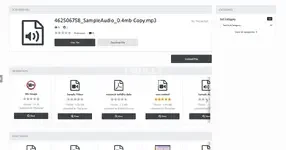
This application will allow your members to upload images, videos, audio and document files including PDF's to stream, play, share, view, download or embed into any of their posts, Your members can also choose to set their uploads to private and if they wanted then, give other members permissions to access them. This application works fully with IPS Clubs allow club owners to create their own media uploader categories
Main Features
- Create unlimited categories to store the uploaded media files in
- You can also create unlimited sub categories
- Choose what file types members can upload per category
- Images - PNG, GIF, JPEG, JPG, JPE
- Videos - MP4, WEBM, OGG, MOV
- Audio - MP3, MP4, WAV
- Documents - PDF, HTML, TXT, XML
- Choose the maximum upload size for each allowed file type per category
- Choose to allow multiple uploads at the same time
- Set the amount of maximum uploads for each file type per category
- Allow members to comment on media files
- All members to review media files
- Allow members to embed their media into the forums and anything what uses the editor ( YES YOU CAN EMBED PDF's TOO )
- Choose what user groups can embed their media into the forums topics etc
- Allow members to crop their uploaded images
- Choose what user groups can crop their images
- If a member crops a image they will have a choice to keep or delete the original image
- Choose what user groups can download uploaded media files ( regardless of this setting members can download their own files )
- Choose what user groups can view / play / stream the actual uploaded file ( regardless of this setting members can view their own files )
- Allow certain member groups to upload private files ( Admin can still view in the admin panel )
- Members can set their private uploads to be viewed by their selected members only ( regardless of the admin viewing / download settings members with permission to view these files given by the uploader will be able to view or download said file )
- Once a member has been given permission to access private uploads they will receive a notification linking them to the file
- Set the maximum storage limit for users via the user group settings
- Set the maximum downloads a day for users via the user group settings
- Set a flood limit on embedding topics for users via the user group settings
- Shows how many views and downloads the media files have had
- Members can see who viewed or downloaded their media ( If logs are enabled in the ACP )


