
![[XenGenTr] Kategori Istatistikleri](/data/resource_icons/12/12924.jpg?1720149301)
- Compatibilité XF
- 2.2.x
- Description courte
- A handy plugin for displaying all category topics and messages as statistics. Easily install via FTP or AdminCP with optional ZipArchive support. Customize appearance with options in the plugin settings.
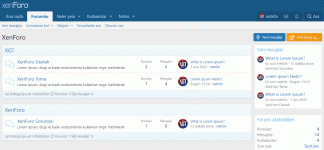
The plugin is a How to? - Display all topics of the category. Displays all topics and all messages in the category's forums as statistics in the category area.
Manual installation
Extract the downloaded XenGenTr-CategoryStatistics-1.0.1.zip file. FTP the src folder in your upload folder to your home directory. Admincp - Install the [XenGenTr] Category Statistics plugin from > Plugins.
Install as ZipArchive If the above option is difficult, then ZipArchive first
you must have support on your server using Admincp -> Plugins -> Install/upgrade from archive. If you have it, you can open src/config.php, add the following code, save, and then do zip installs in the future.
Plugin Options Options for the plugin
you can find it in Admincp -> Appearance and Languages -> Theme Features [XenGenTr] Category Statistics Design.
Supplies
Positioning: left, center, right
Add icons to objects and messages
Set background color
Set font size
Set text color
Item description
![[TH] Holidays - now with Valentine's Day!](/data/resource_icons/1/1228.jpg?1767704951)

![[XTR] Exclusive Black](/data/resource_icons/12/12903.jpg?1720149301)
![[KD] Konu İstatistikleri](/data/resource_icons/1/1502.jpg?1720149245)
![[XenGenTr] AdBlock Dedektoru](/data/resource_icons/1/1133.jpg?1720149240)
![[XenGenTr] Avatar Size](/data/resource_icons/7/7107.jpg?1720149273)