Magento 2 Images WebP | Converteur WebP Automatique par Magefan

Magento 2 Images WebP | Converteur WebP Automatique par Magefan 2.5.7 Nulled

Vous n'avez pas l'autorisation de télécharger
Inscrit(e) le
Jan 20, 2022
Messages
120
Score de réaction
71
Credits
$133
L'extension Images WebP Magento 2 améliore le performant de votre magasin en ligne en convertissant et en servant automatiquement vos images produits dans le format moderne WebP. WebP offre une compression supérieure par rapport aux formats traditionnels comme JPEG et PNG, ce qui entraîne des temps de chargement plus rapides des pages et une expérience utilisateur améliorée sans compromettre la qualité des images.https://magefan.com/magento-2-webp-optimized-imagesCaractéristiques Clés:
  • []*Conversion automatique WebP:Convertez toutes les images de produits et de catégories en format WebP sans intervention manuelle.[]*Support de Fallback:Sert des images JPEG/PNG originales aux navigateurs qui ne supportent pas le WebP, garantissant une compatibilité complète.[]*Amélioré de la Vitesse du Site:Diminuer les tailles d'image de jusqu'à 30-50%, boostant significativement la vitesse de chargement de votre site et ses classements SEO.[]*Configuration Facile:Gérer les paramètres de l'extension directement depuis le panneau d'administration Magento avec une interface utilisateur facile à utiliser.[]*SEO Amicalable:Chargement plus rapide des images contribue à une meilleure classement dans les moteurs de recherche et à une baisse du taux de rebond.[]*Pas d'Impact sur les Images Originales:Fichiers d'image originaux restent inchangés, garantissant une optimisation d'image sécurisée et réversible.[]*Supporte Plusieurs Formats d'Images:Travaux avec des images de produits, d'images de catégories et des pages et blocs CMS.
Avantages:
  • [Améliorez l'expérience d'achat de vos clients avec des pages chargées plus rapidement.[Améliorez les scores de PageSpeed Insights et des Valeurs Web Fondamentales de Google.[Réduire la consommation de bande passante et le chargement du serveur.[Très bien compatible avec les dernières versions de Magento 2.
 
Pièces jointes
Dernière modification par un modérateur:
Can you provide a cracked version?
 
Magefan Community Nulled - replace files and enter any key to save.
Magefan Community Nulled - 替换文件并输入任意键保存。
Yes, I replaced the Community moudle with Magefan Community 2.2.17 Nulled moudle,
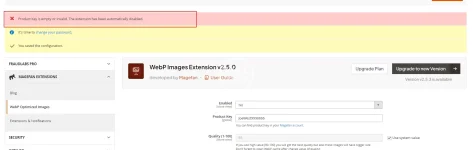
And I deleted the "generated" and "var" directories. After recompiling, the Webp still prompted that it needed to be activated, even though I entered any key in webp Configuration stage.1755479518135.webp
 
Yes, I replaced the Community moudle with Magefan Community 2.2.17 Nulled moudle,
And I deleted the "generated" and "var" directories. After recompiling, the Webp still prompted that it needed to be activated, even though I entered any key in webp Configuration stage.Afficher la pièce jointe 108121
Hold On ,i will check it.new version this package have more vaild .now please modify code from

PHP:
  final public function validate($data)
    {
        if (isset($data[$this->getModule()])) {
            return !empty($data[$this->getModule()]);
        }
        $k = $this->getKey();
      $result =true;
        return $result;
    }
to
Code:
  final public function validate($data)
    {
          return true;
    }
on file
module-community-2.2.17\Model\Section.php
to fix your issue .
 
Dernière modification:
Hold On ,i will check it.new version this package have more vaild .now please modify code from
稍等,我去检查一下。这个包的新版本有更多有效的功能。现在请修改代码。

PHP:
  final public function validate($data)
    {
        if (isset($data[$this->getModule()])) {
如果 (isset($data[$this->getModule()])) { 
            return !empty($data[$this->getModule()]);
        }
        $k = $this->getKey();
      $result =true;   $result = true;
        return $result;
    }
to
Code:
  final public function validate($data)
    {
          return true;
    }
on file 在文件中

to fix your issue .
解决你的问题。
Thanks for you tell,

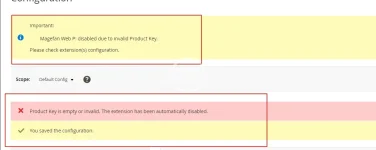
I completed the above modifications and recompiled the code. However, when I accessed the backend page, I found that there was still the error message "Magefan Web P: disabled due to invalid Product Key. Please check the configuration of the extension(s)." Even after I cleared the files and cache and recompiled again, it didn't work.


Besides,
I attempted to remove: </field> <field id="key" translate="label" type="text" sortOrder="30" showInDefault="1" showInWebsite="0" showInStore="0">
<label>Product Key</label>
<frontend_model>Magefan\Community\Block\Adminhtml\System\Config\Form\ProductKeyField</frontend_model>
</field>

On files /Magefan/WebP/etc/adminhtml/system.xml

But,it still didn't work.


1755500547171.webp
 
Thanks for you tell,

I completed the above modifications and recompiled the code. However, when I accessed the backend page, I found that there was still the error message "Magefan Web P: disabled due to invalid Product Key. Please check the configuration of the extension(s)." Even after I cleared the files and cache and recompiled again, it didn't work.


Besides,
I attempted to remove: </field> <field id="key" translate="label" type="text" sortOrder="30" showInDefault="1" showInWebsite="0" showInStore="0">
<label>Product Key</label>
<frontend_model>Magefan\Community\Block\Adminhtml\System\Config\Form\ProductKeyField</frontend_model>
</field>

On files /Magefan/WebP/etc/adminhtml/system.xml

But,it still didn't work.


Afficher la pièce jointe 108136
No .what is magento version?clear var folder and then try it .i can not tested faild
2025-08-18_154124.webp
 
Dernière modification:
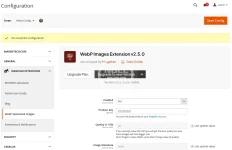
Yes, I did clear the var and generated folder, but it still didn't work. My Magento 2 version is 2.4.7-p7.
 
Yes, I did clear the var and generated folder, but it still didn't work. My Magento 2 version is 2.4.7-p7.
Tested version number was 2.4.8 ,no find any issue .if do not modify any code it is work too with new .
Code:
  final public function validate($data)
    {
        if (isset($data[$this->getModule()])) {
            return !empty($data[$this->getModule()]);
        }
        $k = $this->getKey();
      $result =true;
        return $result;
    }
this code only was touch issue when upgrading was happen,make sure your files floder permission .and remove var folder,run setup:up and then tested-
 
Tested version number was 2.4.8 ,no find any issue .if do not modify any code it is work too with new .
Code:
  final public function validate($data)
    {
        if (isset($data[$this->getModule()])) {
            return !empty($data[$this->getModule()]);
        }
        $k = $this->getKey();
      $result =true;
        return $result;
    }
this code only was touch issue when upgrading was happen,make sure your files floder permission .and remove var folder,run setup:up and then tested-
Sometimes it is necessary to restart PHP to update OPCache data. Even if you need to restart Apache or nginx. If your disk has M2 cache, sometimes you also need to restart the server,linux will cache file when lots of files was update or delete .you can find delete ALL twice ,it was really deleted
 
Haut